Last checked against official OKX help and the live join pages: 28 November 2026 (UTC+8)
If you are opening an OKX account for the first time, the referral code has to go in while you are still creating the account. This walkthrough shows you where that field sits on the official website and in the app, how to use CoinGuideHub’s code HUB888, and what official OKX rules say if the code was skipped or typed incorrectly.
The steps below follow OKX’s own help center and the official join pages as they appeared on 28 November 2026. What you can use on the platform, and any rewards attached to a referral, still depend on your region and on the terms shown on official OKX pages at the time you sign up.
Before you create the account
Have these ready:
- An email address and a mobile number that can both receive verification messages. Official OKX help says you must bind both during registration, and that each email or phone number can be used on only one OKX account.
- To be at least 18 years old. After registration, you still need to complete identity verification before you can buy or sell crypto, or deposit, withdraw, borrow, or transfer funds (including internal transfers).
- The official website or app only. The domain should be an official OKX site, such as okx.com. If a page looks familiar but the address is different, stop and do not enter anything.
A referral code is optional. Official help states that leaving the field blank does not stop you from registering. If you do want HUB888 applied, enter it in this first session — later sections explain why that timing matters.
Use the official join link, or type HUB888 yourself
OKX’s registration guide describes two official ways to sign up with a referral:
- Open a referral (join) link, or
- Type the referral code yourself on the sign-up form.
CoinGuideHub’s OKX code is HUB888. The simplest path is to start from the official join page, which is set up to carry that code:
https://www.okx.com/join/HUB888
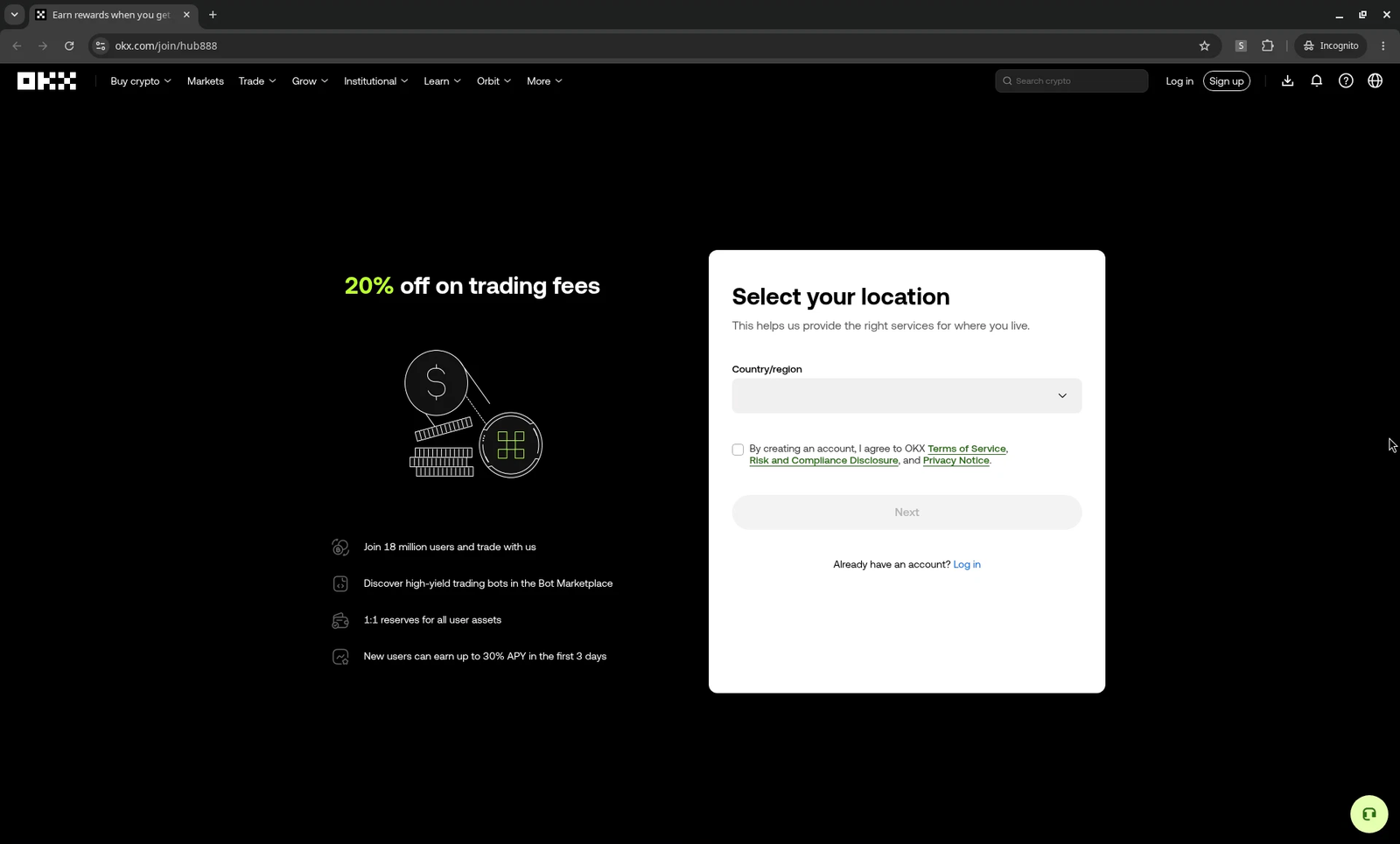
The join URL opens official OKX at the Select your location step. Before you continue, look at the address bar and confirm you are on okx.com (the path may appear as /join/hub888 in lowercase; that is the same official page). Choose the Country/region you actually live in, read and check the box to agree to OKX’s Terms of Service, Risk and Compliance Disclosure, and Privacy Notice, then select Next.
After you choose a location, official OKX may keep you on www.okx.com or continue on a regional official OKX site. Either is fine if the address is still an official OKX domain. If it is not, stop.
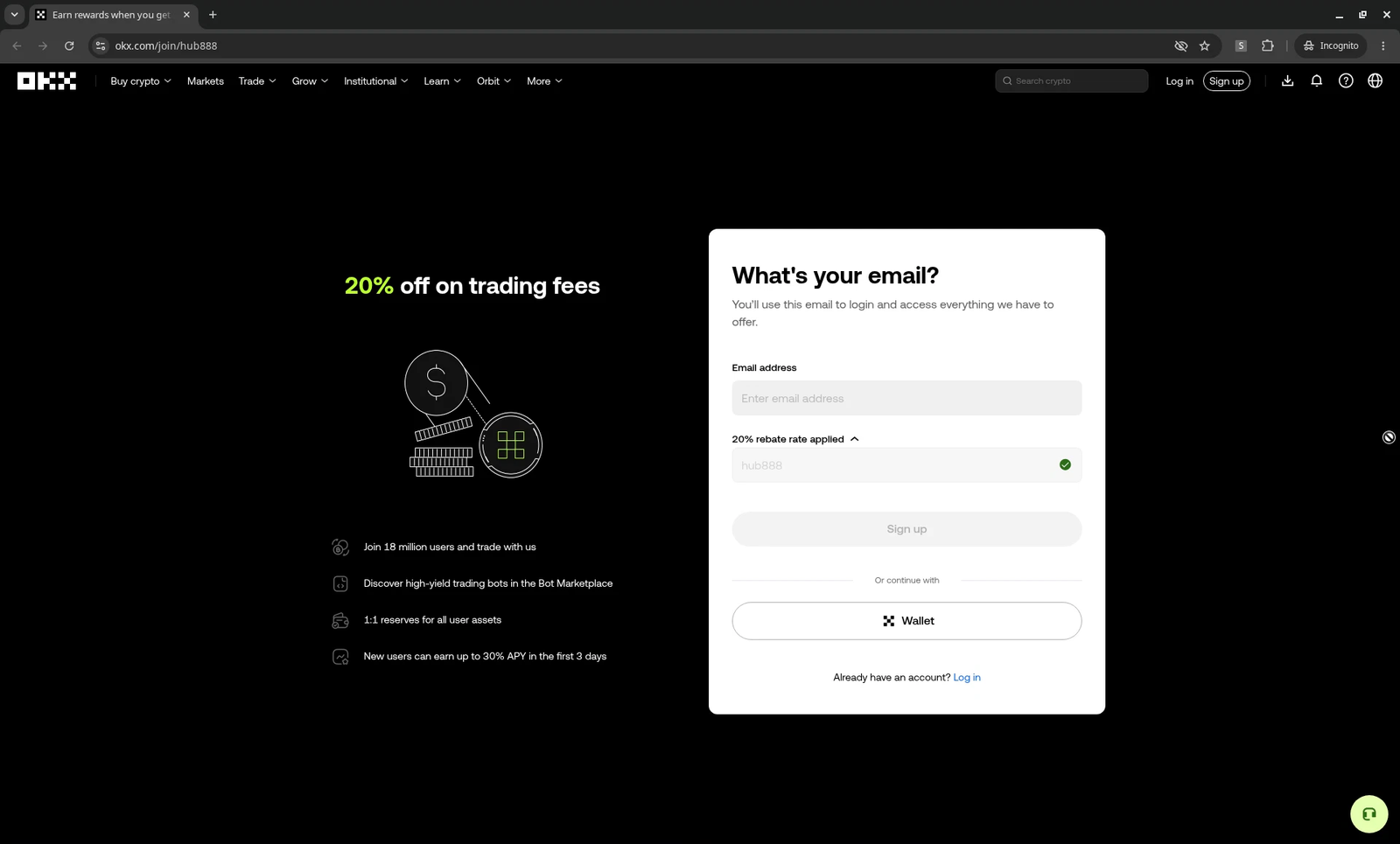
On the next screen, you will be asked What’s your email? Under the Email address field, look for the referral area. When the join link has already attached HUB888, the live form currently shows a line that reads 20% rebate rate applied, not a heading that says “Referral code (optional).” Expand that line if it is collapsed, and confirm the box shows hub888 (the same code as HUB888) with a confirmation check. If the box is empty, type HUB888 in the Enter code field before you select Sign up.
The official join page may also currently display a “20% off on trading fees” message. That is what OKX is showing on the page today. It is not a rate CoinGuideHub guarantees, and it should not be read as a permanent offer. Always go by the official screen at the time you sign up.
One extra check is worth the few seconds: official help notes that if someone opened a different referral or campaign link, or downloaded an app with another code, on the same browser or device within the past 30 days, that earlier code can stay attached and appear prefilled. If you see a code that is not HUB888, do not finish registration in that session. OKX suggests opening a private or incognito browser window, starting again from the join link above, and checking the field before you complete sign-up.
Sign up on the OKX website
These steps follow the official join page as it appeared on 28 November 2026, together with OKX’s account registration guide. The exact layout can vary slightly by region; if a label differs, follow the official screen in front of you.
- Open the official join link above, or go to the OKX website and select Sign up.
- At Select your location, choose your Country/region (the place you actually live, because available features depend on it). Read and check the box to agree to OKX’s Terms of Service, Risk and Compliance Disclosure, and Privacy Notice, then select Next.
- This is the step that includes the referral code. The heading is What’s your email? Enter your Email address. Under that field, expand the referral line if needed — when HUB888 is already applied, it currently reads 20% rebate rate applied — and confirm the box shows hub888. If it is empty, type HUB888 in Enter code. Then select Sign up.
- Enter the email verification code when the official page asks for it.
- Add your phone number, select the correct country code, then continue with the official button (the help center describes this as Verify now).
- Enter the phone verification code to complete registration. If the official page then asks you to set a password, choose a strong one you do not use anywhere else. (OKX’s help for desktop users mentions a password step after phone verification; follow whatever the official screen shows.)
Do not submit the email step until you have looked at the referral field. Official rules treat the referral relationship as something that is set when the account is created, not as a setting you add later in the normal flow.
Sign up in the OKX app
Install the app only from OKX’s official website or from the official Apple or Google app stores. If a join link will not open, official help says you can sign up in the app and enter the referral code by hand, or use a referral QR code if you have one.
App steps from the official registration guide (app labels may differ slightly from the website, including the “20% rebate rate applied” line used on the web form; follow the official app screen):
- Open the OKX app and select Sign up.
- Select your Country/region, read and check the box to agree to the Terms of Service, Risk and Compliance Disclosure, and Privacy Notice, then tap Create account.
- Enter your Email. Find the referral field, expand it if it is hidden, and type HUB888 if it is not already filled in, then select Sign up.
- Enter the email verification code.
- Add your phone number (select the correct country code) and select Next.
- Enter the phone verification code to complete registration.
The referral field is easy to miss. On the official website, it can sit under the email box as a single line — currently 20% rebate rate applied — until you expand it. Official help also notes that you may need to expand an optional referral field to type the code. Scroll the form and open that field if you do not see the code itself.
If you opened the join link on your phone, then downloaded the app separately and started a fresh sign-up inside the app, the code from the link may not carry over. Official help says to reopen the referral link, enter your email on the invite page if you are asked to bind the invitation first, continue into the app from that link, and sign up with the same email — or simply type HUB888 into the referral field before you finish.
If the referral field is hidden or the code is not filled in
Work through these official options, in order:
- On the website, look under the email field for 20% rebate rate applied (or a similar official referral line) and expand it. Confirm the box shows hub888, or type HUB888 in Enter code.
- Reopen https://www.okx.com/join/HUB888 and complete sign-up on the page it opens, rather than jumping away and starting over.
- If the field still does not appear, official help says to sign up through the referral link. In some cases you may be asked to enter your email on the invite page first so the invitation is bound, then complete registration with the same email.
- If the link itself will not open, sign up in the official app and enter HUB888 manually, or contact OKX customer support.
The code has to be applied before sign-up is completed. Official help states that it cannot be added afterwards.
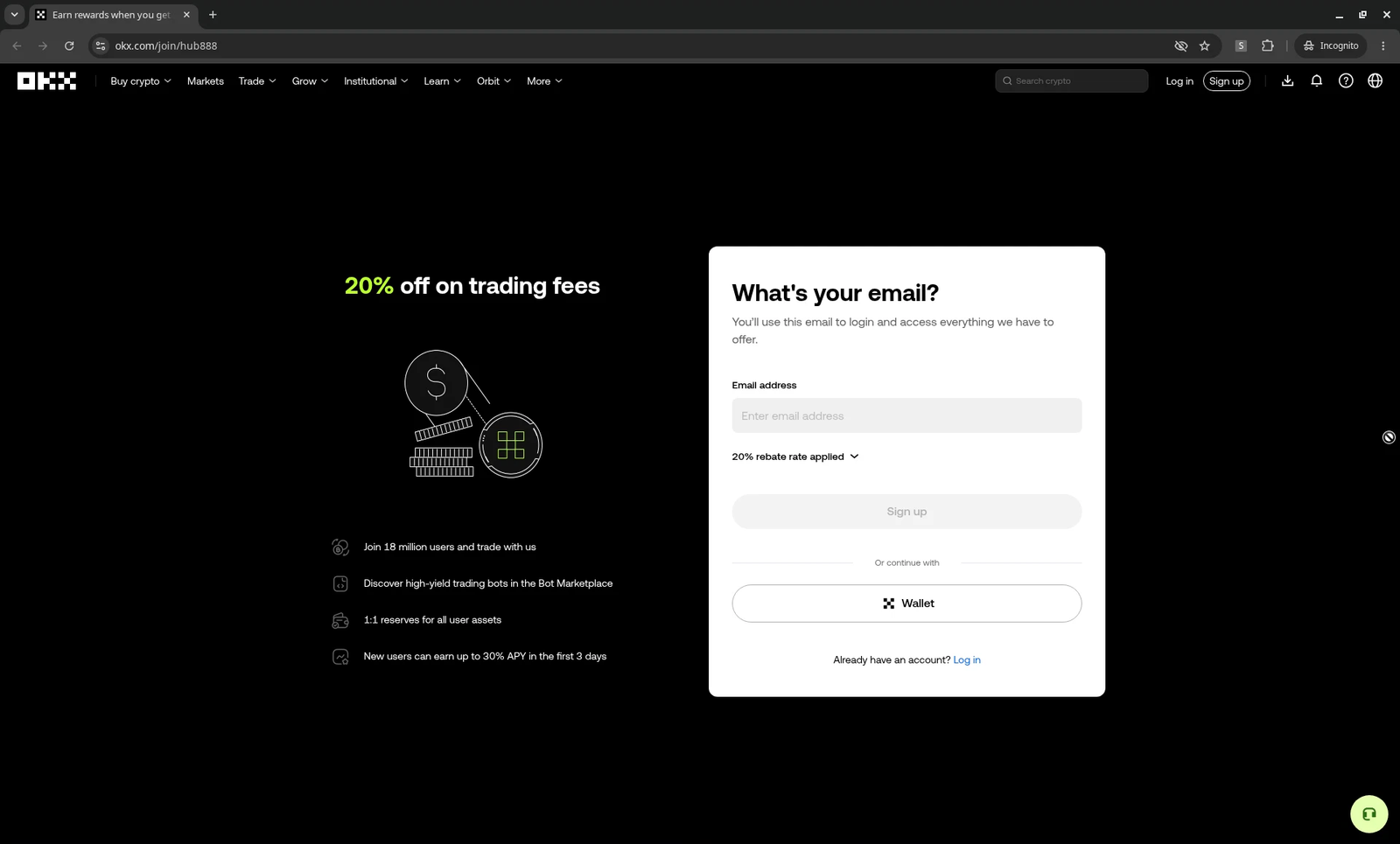
When the line is collapsed, you may only see the rebate-rate text and not the code itself. Expand it before you select Sign up, so you can confirm hub888 is in the box.
After you have an account: identity verification and a quick check
Registration alone is not enough to trade or move funds. Official help requires identity verification, and you must be at least 18. Follow the verification steps OKX shows in your account or app. What documents are requested can depend on your region, so use the official prompts rather than a generic checklist from elsewhere.
To see whether a referrer is linked, official help gives this path in the app: Menu → Account settings → Profile → Referral rewards. If that entry is visible, OKX says a referral relationship exists on the account. If it is not displayed, there may be no referral relationship — or the referrer may not be an affiliate user, in which case the entry might not appear either. If you still need to confirm, official help suggests recalling the code you entered at registration, checking with the person or site that invited you, or asking official OKX support about your own account.
New-user or welcome rewards, when they apply, are shown in official areas such as the rewards or welcome-rewards pages in your account. Task lists, amounts, and deadlines are not the same for every user or region, and they can change. Use what OKX displays for your account.
Signing up through a referral also, per official help, enrolls you in OKX’s new-user promotional events. Any bonus after required tasks is subject to the campaign rules shown to you.
When the account is open, turn on the security options OKX offers, such as two-factor authentication. If you later use the OKX Web3 wallet, keep any seed phrase offline and never share it. Our seed phrase safety guide explains why.
If the code was skipped or typed incorrectly
This is the part that is easiest to get wrong, so here is the official position in plain language.
You have not submitted the sign-up form yet. Go back to the email step, expand the referral line if needed, and make sure it shows HUB888 / hub888. Then continue.
The account is already created. Official referral rules say the code must be added before the account is created, and that invitees cannot add or change a referral code afterwards. OKX’s more detailed referral FAQ adds that the relationship usually cannot be added or changed after registration is complete. It also tells users not to delete the account or create another account in order to change the code. Deleting an account and signing up again does not restore the original referral relationship, referral eligibility, or new-user bonus eligibility. Registering multiple accounts, or using someone else’s account or identity information, also violates program rules.
If you are unsure whether HUB888 was applied, use the Referral rewards check above, or contact official OKX support about your account. Do not open a second account to try to fix a missing or incorrect code.
Frequently asked questions
Where exactly do I enter HUB888?
On the sign-up form, at the same step where you enter your email. On the official website, this currently appears under the email field as 20% rebate rate applied once the join link has attached the code; expand that line to see hub888. If you are typing the code yourself, use the Enter code box.
If I use the join link, do I still need to type the code?
Often the code is filled in for you. You should still expand the referral line and confirm it shows hub888. If it is blank, type HUB888 before you select Sign up.
Can I register without a referral code?
Yes. Official help says the code is optional, and leaving it blank does not affect registration. You would typically miss referral or new-user benefits that depend on that link.
Does HUB888 come with a fixed trading-fee rebate?
The official join page and sign-up form currently display a 20% trading-fee rebate when this referral link is used — for example, “20% off on trading fees” on the join page, and “20% rebate rate applied” once the code is attached. We do not describe that figure as fixed or permanent. Read what the official screen shows at the time you sign up; official offers can change.
How can I tell that HUB888 was applied?
Confirm the field before you submit. Afterward, look for Referral rewards under Menu → Account settings → Profile in the app, as official help describes. If you still cannot tell, ask official OKX support. Empty reward records right after sign-up are not a reliable test, because many benefits depend on later tasks or eligible activity.
The join link would not open. What should I do?
Official help suggests using a referral QR code if you have one, signing up in the official app and entering the code manually, or contacting customer support. Stay on official OKX channels.
Is OKX available where I live?
Availability and product access differ by region. Check OKX’s official terms for your country or region before you sign up, and select that same place on the country/region step.
A short recap
- Start from the official join page for HUB888, or type HUB888 into the referral field while the account is still being created.
- On the website, complete Select your location, the terms checkbox, and Next, then enter your email and confirm the referral line shows hub888 before you select Sign up. In the app, follow the official screens and enter the code at the email step.
- Check the code before you finish. Official rules do not offer a normal way to add or change it later, and you should not create another account to try.
- Complete identity verification when you are ready to use the account, and turn on the security options OKX offers.
- For anything about rebates or welcome tasks, read the campaign details in your own OKX account, and treat the 20% figure on today’s official sign-up page as the current on-page offer, not a permanent promise.
Risk note: Crypto prices can move sharply, and you can lose money. Only use funds you can afford to lose, and only sign up on the official OKX website or app. CoinGuideHub is an independent beginner’s guide and is not the official OKX website. Features, eligibility, and rewards vary by region and are governed by OKX’s current official terms.
⚠️ Educational content only, not financial advice. Some links are referral links; rebates, rewards and campaign terms are per official platform rules.